
Kinetic Art Installation Automation: Sensors to Motion
Published on: September 17th, 2025 · Author: Mees Meyboom
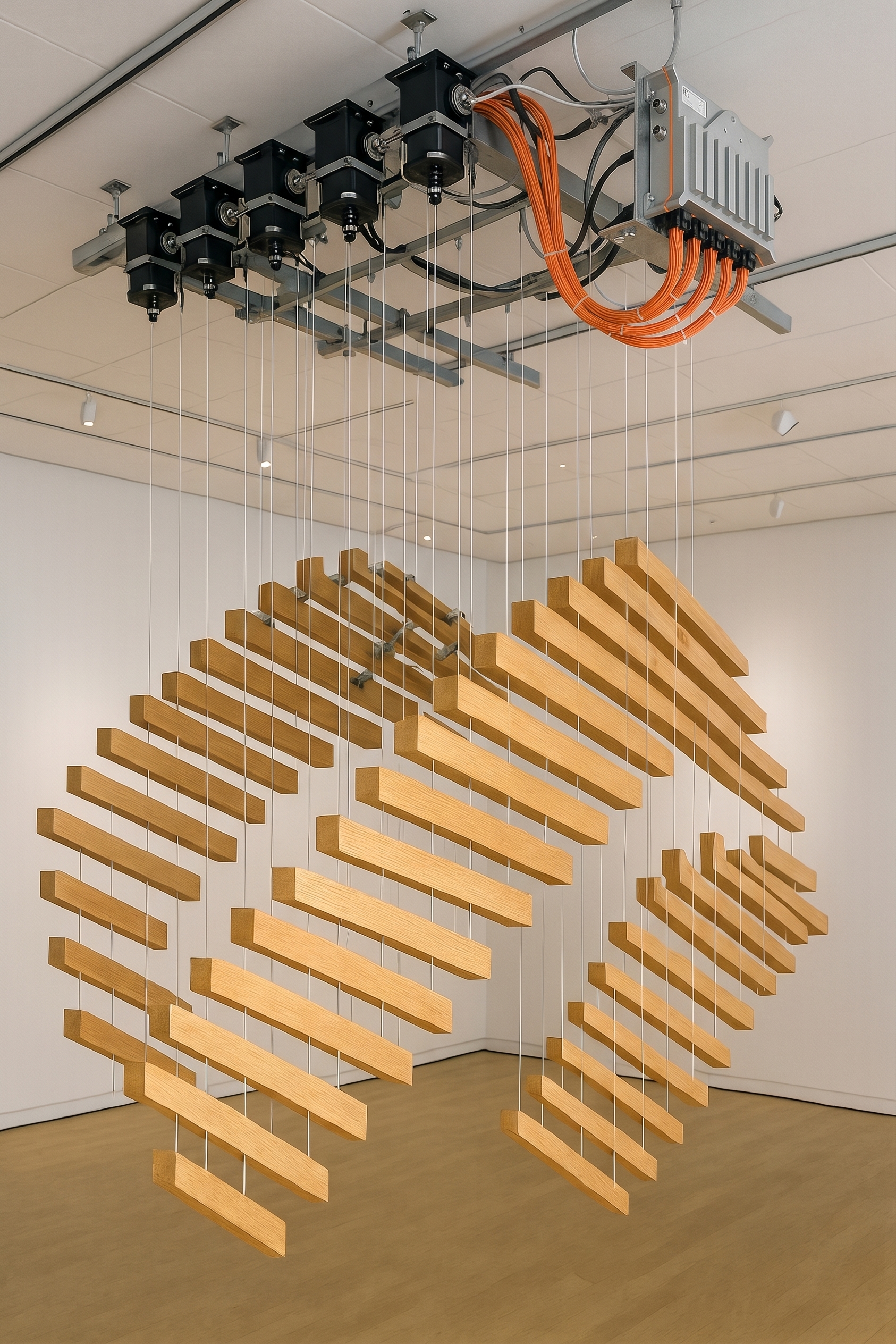
Automating kinetic art connects sensor inputs, a programmable controller, and compatible output hardware to produce movement in an installation. The illustrative art installation automation example below uses the GOcontroll Moduline L4 to trigger and tune a sensor-driven kinetic sculpture; it is not a documented customer deployment.
How does a kinetic art controller turn sensors into motion?
Interactive art installations need to distinguish visitor detection, which triggers behavior, from feedback measuring the artwork’s own movement. This candidate configuration separates those functions from the actuator output stage.
| Role | Candidate hardware | Selection check |
|---|---|---|
| Control logic | GOcontroll Moduline L4 | Eight slots for compatible modules; K30 supply and K15 enable accept 8–32 VDC |
| Sensor acquisition | 6 Channel Input Module | Match sensor outputs to supported modes: 0–5, 0–12, or 0–24 V; frequency up to 10 kHz |
| Compatible DC actuator output | 2 Channel Power Bridge Module | 10 A continuous per channel; check load voltage, starting current, and bridge configuration |
Choose a non-camera proximity sensor for approach detection and compatible position or pulse feedback for measuring movement. The programmed sequence converts a visitor trigger into an actuator command; movement feedback can inform the implemented motion control.
The controller runs logic; the selected bridge module or external motor driver supplies actuator power. Motor speed and positioning performance depend on the actuator, feedback, mechanical load, and control implementation. Take detailed wiring and motor-drive selection questions to the Moduline knowledge base.
Build and validate motion with MATLAB Simulink
Develop the movement sequence with MATLAB Simulink:
- Define visitor triggers, movement sequences, and adjustable parameters.
- Model the mechanics and electrical behavior needed to evaluate timing and motion.
- Simulate, generate application code, deploy, and validate on the physical installation.
The documented L4 workflow requires Embedded Coder, MATLAB Coder, Simulink Coder, Stateflow, and the GOcontroll Simulink Toolbox. Create the model from the GOcontroll Linux template and build it through Embedded Coder.
Simulation predicts modeled behavior, not guaranteed physical movement. Agreement with the sculpture depends on the mechanical and electrical models and hardware validation.
GOcontroll Moduline M1, GOcontroll Moduline L4, and GOcontroll Moduline HMI1 run Linux and support MATLAB Simulink, Node-RED, C, and the GOcontroll AI Application Builder. GOcontroll Moduline S1 runs FreeRTOS and supports C, MATLAB Simulink, and the GOcontroll AI Application Builder.
Tune interactions with Node-RED and remote access
Node-RED on the L4 can read Simulink signals and write exposed parameters. Build an application-specific dashboard for sequence timing, sensor thresholds, or motor-speed setpoints. Assign one application owner to each I/O module and exchange signals and parameters between applications rather than independently commanding the same hardware.
Persistent saving and uninterrupted behavior during parameter changes require implementation and testing. Remote dashboard access also needs configuration; it is not established merely by creating a dashboard.
GOcontroll Connected provides secure remote access and firmware updates for the L4. Firmware-over-the-air updates can change application motion sequences. System-health, energy-use, and interaction monitoring require relevant signal acquisition, processing, and presentation. Connectivity alone does not provide learning or adaptive behavior; those require separately implemented application functionality.
Assess outdoor art installations as complete systems
The L4 has an IP67 protection rating and a specified temperature range of -20 °C to 85 °C. Outdoor suitability still depends on the complete installation and its exposure conditions. Assess connectors, cabling, power equipment, actuator protection, mounting, and maintenance—not just the controller enclosure. These specifications do not establish all-weather operation for the entire sculpture.
Frequently asked questions
What is considered kinetic art?
Kinetic art incorporates real or apparent movement. It includes naturally moving works and motor-driven installations; this article focuses on automated, sensor-responsive movement.
Can you give me an example of kinetic art?
A wind-driven mobile is a passive example. An automated example is an interactive sculpture that starts a programmed movement sequence when a proximity sensor detects an approaching visitor. The L4 configuration here is illustrative, not a reported deployment.
Which motion sensors should an artist choose?
Separate visitor detection from artwork movement feedback. A non-camera proximity sensor can detect approach, while suitable position or pulse feedback measures the sculpture’s movement. Confirm that each sensor’s electrical output matches the selected input module.
Can Node-RED tune a running movement sequence?
Yes. Node-RED on the L4 can read Simulink signals and write exposed parameters. The application must define permitted changes, implement persistent saving where needed, and test whether changes can occur without interrupting motion.
Key takeaways
- The L4 provides eight module slots; installed modules determine its I/O capabilities.
- Visitor detection and movement feedback serve different purposes.
- Validate simulated motion against the physical sculpture and its load.
- Node-RED tuning, remote monitoring, and outdoor operation require application-level implementation and checks.
Latest blog
-
Interview with Huib from H2Consultancy
Selecting a fuel cell is only the beginning. The components, control system and application must then work together. Huib Hupkens van der Elst of…
-
Telematics Retrofit: CAN Data or Added Sensors?
Older machines can join connected fleets, but a CAN connection does not guarantee useful data. Audit available signals, sensor requirements, and platform access before…
-
Dutch Embedded Controller Suppliers: 3 Routes
Compare three sourcing routes: custom electronics, an embedded computer, or a modular machine controller. Define what the supplier delivers and what your OEM still…