Skip to content
  • Solutions
  • Products
  • Projects
  • Knowledge base
  • About us
  • English
    • English
    • Nederlands
GOcontroll
  • Solutions
  • Products
  • Projects
  • Knowledge base
  • About us
  • English
    • English
    • Nederlands
Contact us
GOcontroll

FileZilla

Skip to main content
How Can We Help?
  • Before you start

    • Connections

      • Supply voltage
      • Hot plugging
      • USB connections
    • Security

      • Security
    • Software Releases

      • apt packages
      • Module firmware
      • Linux images
  • Getting started

    • Step 1: Wiring

      • Wiring essentials
      • Main controller
    • Step 2: Connect

      • Wi-Fi hardware option
      • Wired ethernet
      • USB
    • Step 3: Login

      • Serial terminal
      • SSH terminal
      • Node-RED
      • FileZilla
      • Secured login
    • Step 4: Programming

      • Examples

        • Node-RED data logging
        • Fastloop control
      • Node-RED

        • Important notice
        • First Flow
      • Simulink

        • Important notice
        • Setup toolchain
        • Create model
        • Upload binary
        • External control
        • External monitoring
        • Exchange with Node-RED
        • Diagnostic codes (Faults)
        • Using the blockset
  • Modular hardware

    • Controllers

      • Moduline S1
      • Moduline M1
      • Moduline L4
      • Moduline HMI1
    • Modules

      • 6 Channel Input Module
      • 6 Channel Output Module
      • 10 Channel Input Module
      • 10 Channel Output Module
      • 2 Channel Power Bridge Module
      • 4-20 mA Input Module
      • Multibus Module
      • Loadcell Module
  • System configuration

    • GOcontroll utilities

      • identify
      • go-modules
      • go-simulink
      • go-upload-server
      • go-bluetooth
      • USB serial console
      • Cellular service
      • go-multibus
      • Web UI

        • Login
        • Services
        • Wi-Fi settings
        • WWAN Settings
        • Diagnostic codes (Faults)
        • Simulink Configuration
    • General utilities

      • Wi-Fi configuration
      • CAN bus
      • Static IP
      • Node-RED Service
      • ModemManager
      • NetworkManager
      • Systemd services
  • Controller setups

    • Moduline M1
    • Moduline L4
  • Resolved issues

    • Output module fails to initialize
  • Advanced Topics

    • Re-flashing the controller
    • Opening/closing the controller
< Back

FileZilla can be used to upload and download files from your controller. FileZilla can be used over wired ethernet and/or Wi-Fi connection. Independent the type of connection, it is important to know the IP address of the controller.

Be aware that changing or deleting files can stop your controller from functioning. If that happens, you can install a complete new image yourself, as described in Re-flashing the controller.


Using FileZilla

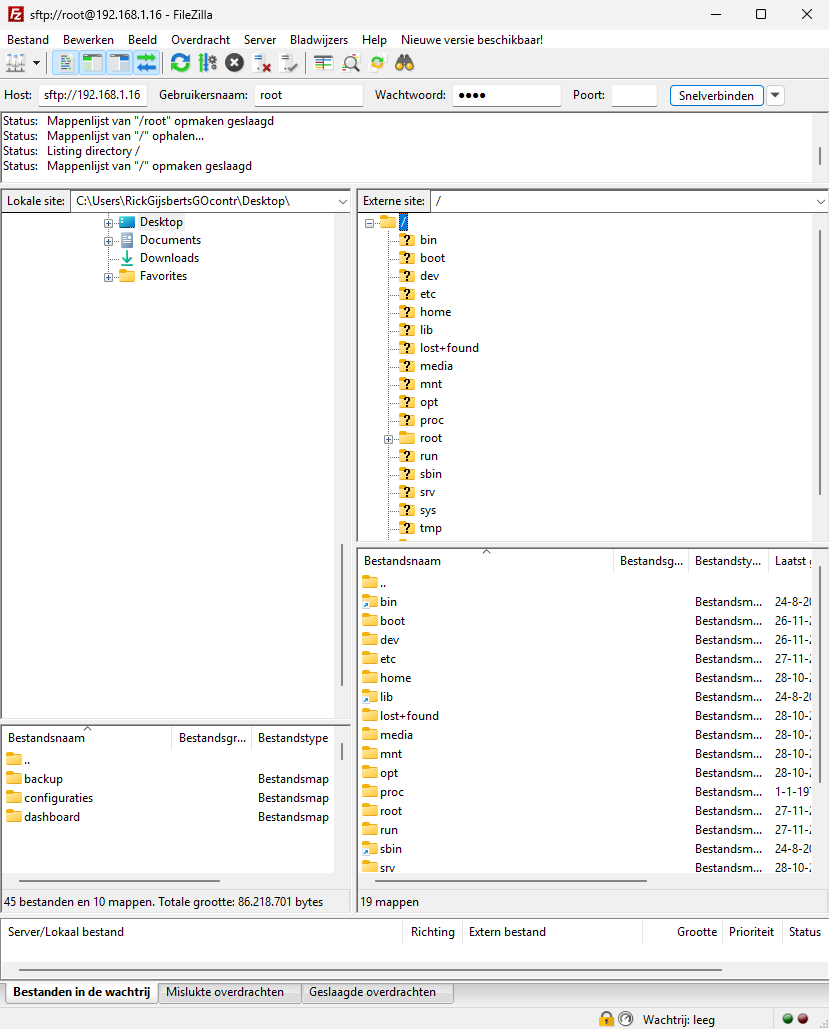
For this example we use the wired ethernet connection. We discovered that the IP address of the controller was: 192.168.1.16

  • Provide your Host address : 192.168.1.16 (sftp:// is automatically added by FileZilla in case of port 22)
  • Username: root
  • Password: root
  • Port: 22

When the connection is successfully established, the folder structure on the controller (right) is visible.

We work for

Equisport H2 Consultancy HAN University of Applied Sciences Hydroma ICM Kraker The Land Rovers Volvo MAN Liebherr
Product links
  • 6 Channel Input Module
  • 6 Channel Output Module
  • 10 Channel Input Module
  • 10 Channel Output Module
  • 4-20 mA Input Module
  • 2 Channel Power Bridge Module
  • GOcontroll Moduline S1
  • GOcontroll Moduline M1
  • GOcontroll Moduline L4
  • GOcontroll Moduline HMI1
Service Links
  • GOcontroll Knowledge Base
  • Blog
  • Contact
  • General Terms and Conditions
  • Privacy statement
Contact

GOcontroll B.V.
De Hogenkamp 20
7071 EC Ulft
The Netherlands
+31 6 15 33 34 57

CoC : 88866645
Tax ID : NL864805068B01

Copyright 2026 GOcontroll® | All Rights Reserved