Skip to content
  • Solutions
  • Products
  • Projects
  • Knowledge base
  • About us
  • English
    • English
    • Nederlands
GOcontroll
  • Solutions
  • Products
  • Projects
  • Knowledge base
  • About us
  • English
    • English
    • Nederlands
Contact us
GOcontroll

Node-RED

Skip to main content
How Can We Help?
  • Before you start

    • Connections

      • Supply voltage
      • Hot plugging
      • USB connections
    • Security

      • Security
    • Software Releases

      • apt packages
      • Module firmware
      • Linux images
  • Getting started

    • Step 1: Wiring

      • Wiring essentials
      • Main controller
    • Step 2: Connect

      • Wi-Fi hardware option
      • Wired ethernet
      • USB
    • Step 3: Login

      • Serial terminal
      • SSH terminal
      • Node-RED
      • FileZilla
      • Secured login
    • Step 4: Programming

      • Examples

        • Node-RED data logging
        • Fastloop control
      • Node-RED

        • Important notice
        • First Flow
      • Simulink

        • Important notice
        • Setup toolchain
        • Create model
        • Upload binary
        • External control
        • External monitoring
        • Exchange with Node-RED
        • Diagnostic codes (Faults)
        • Using the blockset
  • Modular hardware

    • Controllers

      • Moduline S1
      • Moduline M1
      • Moduline L4
      • Moduline HMI1
    • Modules

      • 6 Channel Input Module
      • 6 Channel Output Module
      • 10 Channel Input Module
      • 10 Channel Output Module
      • 2 Channel Power Bridge Module
      • 4-20 mA Input Module
      • Multibus Module
      • Loadcell Module
  • System configuration

    • GOcontroll utilities

      • identify
      • go-modules
      • go-simulink
      • go-upload-server
      • go-bluetooth
      • USB serial console
      • Cellular service
      • go-multibus
      • Web UI

        • Login
        • Services
        • Wi-Fi settings
        • WWAN Settings
        • Diagnostic codes (Faults)
        • Simulink Configuration
    • General utilities

      • Wi-Fi configuration
      • CAN bus
      • Static IP
      • Node-RED Service
      • ModemManager
      • NetworkManager
      • Systemd services
  • Controller setups

    • Moduline M1
    • Moduline L4
  • Resolved issues

    • Output module fails to initialize
  • Advanced Topics

    • Re-flashing the controller
    • Opening/closing the controller
< Back

To login to the Node-RED environment, a wired ethernet and/or Wi-Fi connection is mandatory. Independent the type of connection, it is important to know the IP address of the controller. Node-RED runs as a service on the controller, and that service must be running before you can login. See Node-RED Service to start, stop or enable it at boot.


Login to Node-RED

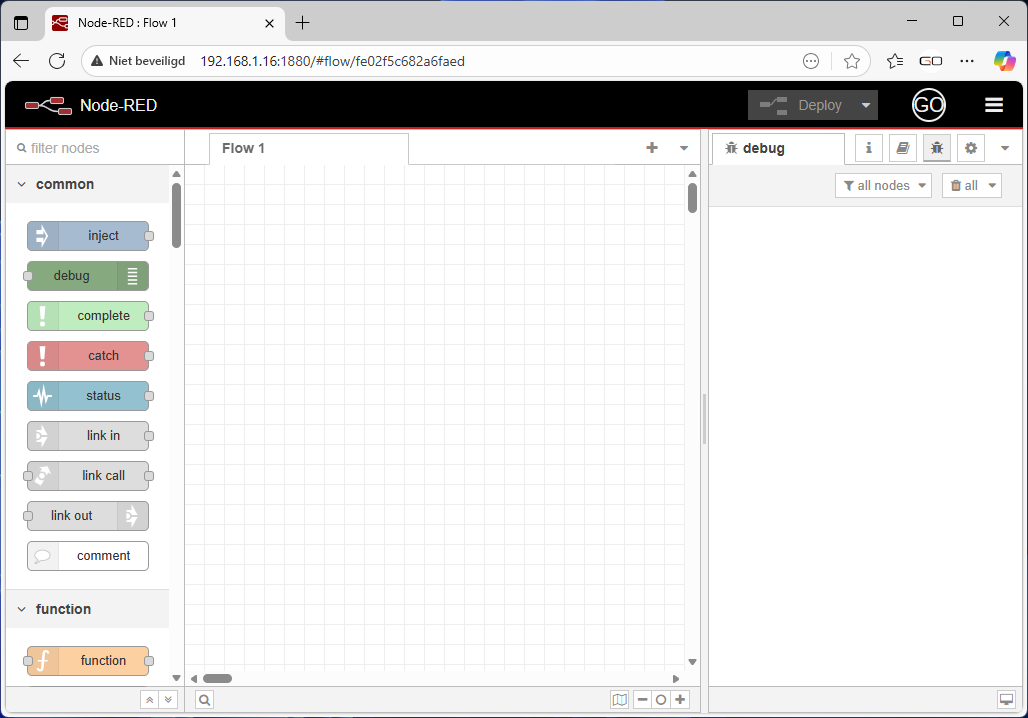
For this example we use the wired ethernet connection. We discovered that the IP address of the controller was: 192.168.1.16 Use your preferred web browser to access Node-RED. For this example we use Microsoft Edge.

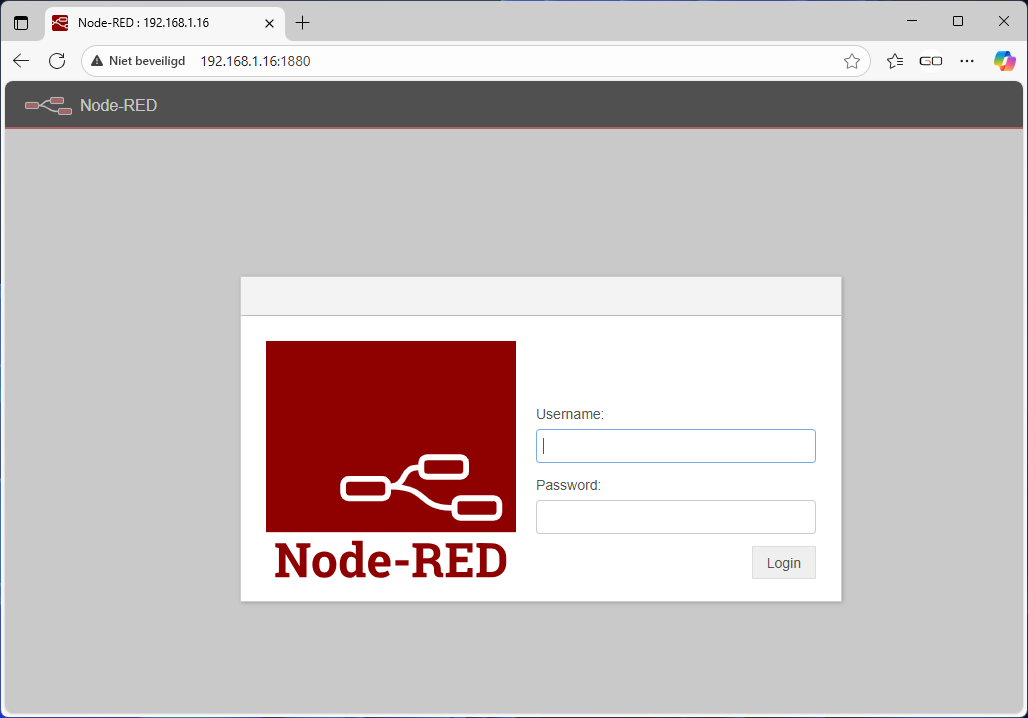
  • Browse to your controllers IP address followed with the Node-RED port: 192.168.1.16:1880
  • Username: GOcontroll
  • Password: Moduline
  • Click: Login

If login is successful, you can start creating your first Flow in Node-RED. Have a look at the website of Node-RED for more information.

We work for

Equisport H2 Consultancy HAN University of Applied Sciences Hydroma ICM Kraker The Land Rovers Volvo MAN Liebherr
Product links
  • 6 Channel Input Module
  • 6 Channel Output Module
  • 10 Channel Input Module
  • 10 Channel Output Module
  • 4-20 mA Input Module
  • 2 Channel Power Bridge Module
  • GOcontroll Moduline S1
  • GOcontroll Moduline M1
  • GOcontroll Moduline L4
  • GOcontroll Moduline HMI1
Service Links
  • GOcontroll Knowledge Base
  • Blog
  • Contact
  • General Terms and Conditions
  • Privacy statement
Contact

GOcontroll B.V.
De Hogenkamp 20
7071 EC Ulft
The Netherlands
+31 6 15 33 34 57

CoC : 88866645
Tax ID : NL864805068B01

Copyright 2026 GOcontroll® | All Rights Reserved